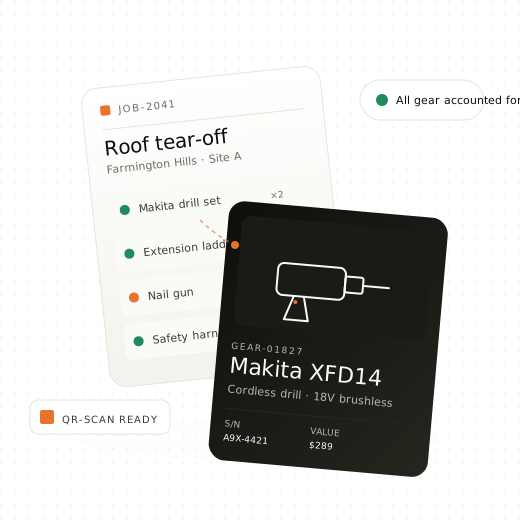
Photograph a pile of gear and FieldVault files it for you — names, brands, models, serials, even the asset tag. Then track every tool, kit, and asset across every crew and job site. Minimal setup. Real‑time visibility. Priced so you can actually afford to roll it out company‑wide.
The slowest part of any inventory system is the first day — typing hundreds of items into a form. Point a camera at the shelf, the truck bed, or the job trailer instead, and FieldVault reads what's in the shot.
A shelf, a pile, a truck bed — whatever's in front of you, straight from your phone. Multiple angles of the same gear work too; FieldVault combines them instead of double‑counting.
Name, brand, model, category, and condition for each piece it finds — and it reads the small print: asset tags, serial numbers, and model plates, straight off the photo.
Everything lands in a review queue, so nothing enters your inventory unchecked. Fix a guess, add another angle to sharpen it, drop what you don't want — then add the rest in one click, photo attached.
No camera handy? Scan a barcode to identify it instantly, or upload a receipt and FieldVault reads every line item off it.
Gear scattered across trucks, warehouses, and job sites. The spreadsheet hasn't been right in three years. Every audit is a guess.
"I never had that drill." No paper trail, no accountability, and you're the one buying a replacement out of next month's margin.
Enterprise asset platforms cost a fortune, take months to implement, and require a specialist to run. Your crews won't touch them.
A missing nail gun here. A "borrowed" ladder there. Over a year, it's tens of thousands of dollars you'll never see again.
A focused set of tools built for how field crews actually work — not how warehouse software thinks they should.
Every item, with photos, serial numbers, purchase info, documents, and condition — in one searchable place. Personal or company‑owned.
One action handles all three. Flag overdue items. Log condition on return. Full audit trail — no more "I never had that."
One click turns your inventory into a dated schedule PDF — photos, serials, asset tags, condition, purchase and replacement values, with totals. The document your insurer asks for, without the spreadsheet weekend.
Tie every check‑out to a job, client, or project. Know exactly what's on which site, with which crew, and when it's due back.
Four‑tier access — owner, admin, manager, viewer. Your apprentice can log items without seeing the finances.
Permanent, mobile, and temporary sites. Set a home base per ownership type — anything elsewhere shows as checked out, automatically.
Record the coverage term against the purchase date and FieldVault does the maths. Expiring and expired gear is flagged before the claim window closes, not after.
Utilization, overdue check‑outs, and a value summary out of the box — plus a filter‑aware Excel workbook with full inventory, insurance totals, and kit packing lists.
Spreadsheet‑style grid for adding 50 items at once. Import from XLSX. Export to Excel or JSON anytime — your data is yours.
Photograph your gear and FieldVault identifies each item — manufacturer, model, serial plate — for one‑tap bulk add to inventory.
Scan a barcode to jump straight to that item, or identify a brand‑new one from its manufacturer barcode — no photo, no typing.
Photograph or upload a receipt — FieldVault reads every line item, vendor, and price, ready to review and add to inventory in bulk.
Group items into job‑ready kits — roof tear‑off, camera B‑roll, landscape prep. Check the whole kit out in one action.
Row‑level security, encrypted at rest, exportable anytime. We don't resell, mine, or train on your data. Period.
One email field. If it's on Microsoft Entra ID (formerly Azure AD), you're routed straight into SSO — otherwise a magic link lands in your inbox. No passwords, no enterprise sales call.
No implementation consultants. No multi‑week onboarding. You're three steps away from knowing where your gear is.
Sign up with Microsoft or email. Name your organization. Pick an industry preset — roofing, construction, AV, landscaping, carpentry, or start blank. Done.
Photograph a pile and let AI file it, add items one at a time, or paste fifty rows into the bulk grid. Import from the spreadsheet you've been nursing for years. We keep the serials straight.
Add team members by email with the right role. Everyone checks items in and out from their phone. You see everything, in real time, from anywhere.
FieldVault ships with category presets for the industries we know best — but the categories are yours to customize.
Ladders · harnesses · nailers
Tools · power · scaffolding
Cameras · lenses · lighting
Saws · drills · fasteners
Mowers · trimmers · blowers
We've used the alternatives. Here's where the others lose field teams — and where we don't.
| Spreadsheets | Legacy asset platforms | FieldVault | |
|---|---|---|---|
| Setup time | Days of building | Weeks + consultants | 10 minutes |
| What you pay for | The time you waste | Items + users + admins + features | Business size only |
| Item limits | Whatever your sheet can hold | Capped — pay more to track more | Unlimited on every paid plan |
| Real-time check-in / out | Not really | Yes | Yes, with audit trail |
| Jobs & crew-aware | No | Warehouse-first, not field-first | Field-first by design |
| Customize without consultants | Endless tab-wrangling | Pro Services engagement to add a field | Self-serve — no Pro Services required |
| Microsoft 365 sign-in | — | Enterprise tier only | Included on every plan |
| Your data, exportable | It's your file | Export gated by tier | CSV export on every plan |
What we're shipping next. We release often and tell you what we're working on.
Print in‑app labels. Scan with any phone camera to check items in or out in seconds.
No signal on the site? Log everything locally and sync automatically when the crew rolls back into range.
Automatic email nudges when a check‑out passes its anticipated return date. No more manual chasing.
Service reminders by date or usage hours. Log repairs, attach receipts, and keep a full history for every asset.
We're finalizing plans. Unlimited assets and unlimited crew on every paid plan — you're never billed per item, and no usage meter runs in the background. Plans step up by how many people sign in and how many workspaces you run, and every price you can buy online will be published on the page. See the full pricing breakdown, or drop your email below and you'll be the first to hear — plus early‑access pricing for founding customers.
We'll only use this to announce pricing. No marketing list.
Ten minutes from now, you could know exactly where every piece of gear in your company is.